Privacy and security
Effective 24 November 2026. Misha has no server of its own. It runs on your Mac and works through your own accounts: the clone sends what it reads and writes to the provider of the model you choose, Anthropic through your Claude Code or a provider such as OpenAI through your OpenCode, workers send their work to the provider of the model they run on, and Slack and the services you connect receive what Misha sends them. Misha keeps its own records on your Mac, some of them with no age limit.
This page covers the Misha app for macOS, the Misha Browser extension and its native host, the Claude Code and OpenCode sessions Misha starts, this documentation site and the landing page at dumdummisha.ai. It is the privacy policy for all of them.
Security assessment
Each row links to the section that holds its evidence.
| Question | Answer |
|---|---|
| What leaves the Mac | Slack messages that need the clone, their conversation, your Routines, files and tool results go to the provider of the model the clone runs on: Anthropic through your Claude Code, or a provider such as OpenAI through your OpenCode. A Slack image the clone reads goes to a separate model call, Claude by default. Workers send their work to their model's provider: Anthropic, or through OpenCode any provider it is set up for. Replies go to Slack; queries and changes to the services you connect. There is no Misha server. |
| Accounts and terms | Every recipient works under your own account and its terms. These docs do not establish any provider's retention or your organisation's terms. |
| Slack identity | Misha acts as you through your signed-in Slack web session, not as a Slack app, and Slack counts the clone's calls as your own activity. What a workspace administrator sees, and whether this fits Slack's terms for your workspace, is not established here. |
| Credentials | The Slack token is used only inside your Slack tab. Claude Code and OpenCode keep their own sign-ins. Integration tokens sit in their own stores; Misha's modules read them to call those services, and read every stored credential they know of to check outgoing text on the Mac. |
| Browser access | Access to all sites, automatic recording of every tab's fetch and XHR requests, and native messaging. The request log stays in browser memory until tab_network returns it, redacted only by name and pattern, to a local agent that can send it to its model provider. New Slack messages wait in a bounded queue on disk. Browser storage lists both. |
| Machine authority | The clone runs in restricted Claude Code or on Misha's private OpenCode configuration, with read-only tools for other people. Workers run Claude Code or OpenCode with a shell. Claude workers keep your Claude Code permission rules; GPT workers run on Misha's own OpenCode configuration, which grants a shell and outside-folder access and approves requests left at ask. No operating system sandbox. |
| Updates | A signed build downloaded from GitHub Releases. No updater, pinning or rollback. |
| Audit | A ledger of every Slack post, edit, upload and reaction, never deleted. No record of every shell or cloud command. |
| Approvals | On for a new account: replies and everything else Misha would do in Slack, and work a message would start, wait on Home for your OK. Enforced by the app, which sends only what you approved. |
| Stopping | Pause stops Misha watching Slack for the clone, starts no new work from it and tries to stop the workers on it. Ordinary messages that arrive while paused aren't queued for later. Workers you start from your own agent sessions keep running; one it could not confirm stopped is named on Home. It undoes nothing already done. |
| Removal | No uninstall yet. The safe steps today remove the browser parts and keep the data folder, which holds the install records a removal needs. Transcripts, sign-in tokens, Slack posts and services' records stay. |
| Residual risks | Confident wrong replies posted as you, instructions hidden in content, one clone session across conversations, broad browser observation, workers acting as your Mac user, work records with no age limit. |
Privacy policy
Where data goes
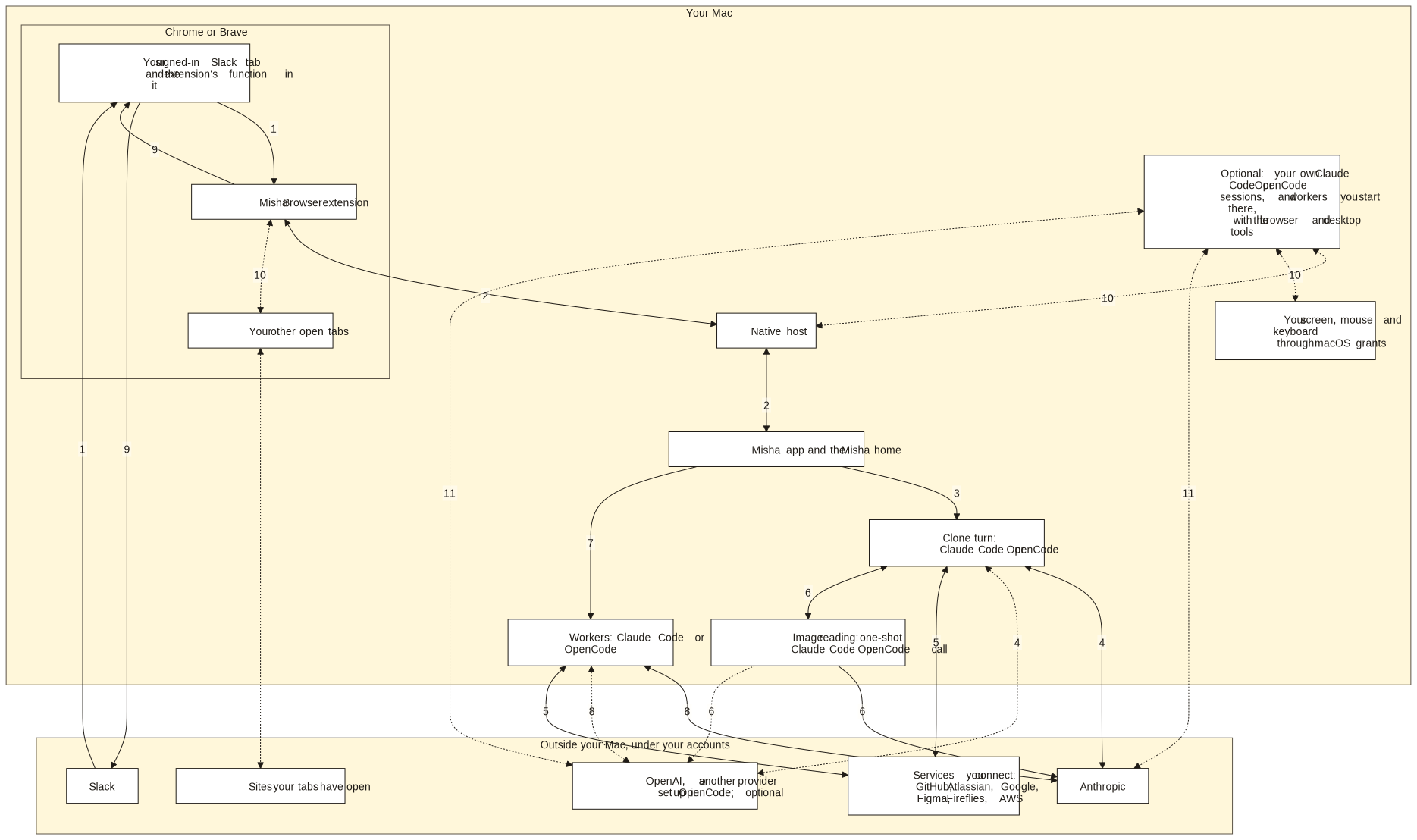
Select the diagram to open it full size.
- Your signed-in Slack tab receives messages over Slack's own connection. The extension reads every new message that arrives there, in any conversation, cut down to fixed fields, and queues it in the browser.
- The extension passes each message through the native host, a small program that connects the extension to Misha on the same Mac, to the Misha app. The host stores nothing. The app records that the event arrived and decides from your settings whether the message needs the clone. Only a message that does is saved with its text in
misha.db, to wait for the clone; for any other it keeps bookkeeping only, such as the receipt and the threads you reply in. - For a waiting message, the app gives the clone, which runs on Claude Code or OpenCode with the per-turn access limits below, the message, the conversation it belongs to, your settings, Routines included, and notes.
- The clone's runtime sends that conversation, any file it reads and every tool result to the provider of the model the clone runs on: Anthropic under your Claude subscription, or the provider your OpenCode is signed in to for that model.
- The clone and the workers read from the services you connected and, where you or your settings allow, change things there.
- When the clone reads an image posted in Slack, a separate one-shot model call answers its question about the image: by default Claude Haiku through your Claude Code, with no tools and no saved session, or a model the clone names, which runs through OpenCode's tool-free
liteagent on your own OpenCode configuration when it is another provider's: that call loads your OpenCode plugins and saves an OpenCode session. The image and the question go to that model's provider, and the answer joins the clone's conversation. - When you, or someone you allowed, asks for work, the app starts workers: separate Claude Code or OpenCode sessions that do one task. A worker's brief can carry your routine and the skills and commands it names, where they bear on the task.
- A worker sends its task, the code and its tool results to the provider of the model it runs on: Anthropic for a Claude model, OpenAI for a GPT model, or any other provider your OpenCode is set up for, which the code does not rule out.
- The extension posts the clone's and workers' messages and makes its allowlisted Slack calls from a function it runs inside your signed-in Slack page, so the calls reach Slack from that page, as you. Right before each call it records activity in Slack's own activity-session entry in that page's storage, which Slack's client reports to Slack as your time in Slack. A file upload's bytes go to the upload address Slack's answer names, whose host the extension does not check.
- Optional and separate from the clone: if you turn on Browser control for your own agent sessions, register the misha-browser tools with your own Claude Code or OpenCode, or an extension grants them to a worker, they send requests through the same host and extension to your other tabs and get back page text, screenshots and the request log. The Browser control connector serves your own agent sessions, and workers you start there with a profile that grants its tools, never the Slack clone or the workers it starts. Their desktop tools capture your screen and move the mouse and keyboard through macOS, without the extension. The extension records the fetch and XHR requests every tab sends whether or not a tool is in use.
- Those sessions send what the tools return to their own model provider.
Three configurations reach different data, and no single Slack message uses all of it: a baseline clone turn uses the tools and services above, a worker given an extension's extra tools reaches whatever those tools reach, and the browser and desktop tools, from Browser control or registered standalone, reach your tabs, screen and keyboard for the agent they serve. Personalising the clone, adding extensions or using the browser tools adds no confidentiality guarantee.
Adding or removing a connector on Extensions applies wherever Misha supplies the connector, including your own agent sessions and workers. Removing it refuses subsequent calls, even from a tool list a session cached earlier. It does not undo an earlier call, revoke your sign-in to the service or disable a separate server you installed yourself.
Who receives it
| Recipient | What it receives | Under |
|---|---|---|
| Anthropic | While the clone runs on Claude Code: messages it considers, their conversation, your personality, Routines and notes, files it reads, tool results. Claude workers' tasks, code and tool results; Slack images and questions sent to a Claude model, the default | Your Claude subscription in Claude Code, and Anthropic's terms for it |
| OpenAI, if you use it | Everything a GPT worker is given and produces, for a review or any other task: its task, code, tool results and what it reads; a Slack image and question the clone sends to a GPT model; the clone's conversation, with your personality, Routines and notes, when you run the clone on an OpenAI model through OpenCode | Your OpenAI sign-in in OpenCode |
| Another provider set up in OpenCode | The same, for the clone, a worker or an image read run on that provider's model. OpenCode offers the models your sign-ins enable, and Misha does not limit the choice to GPT | Your sign-in to that provider in OpenCode |
| Slack | Posts, edits, uploads and reactions, and the Web API reads the clone makes. Slack's own client also reports the activity sessions the extension records before each call, so Slack sees you as active when the clone acts | Your Slack account, through your web session |
| GitHub | Clones, branches, pull requests and merges where you allowed them | Your GitHub CLI sign-in |
| Atlassian, Google, Figma, Fireflies, AWS | Queries, and the tickets, pages, Docs and Sheets workers or your own turns create or change; Figma and Fireflies are read only | Your sign-in to each, where you connected it |
| The publisher of Dumdum Misha | Nothing from the app or the extension. Only an email you send to ask for an invite, and what you enter when you book a call | See the websites |
| Calendly | What you enter when you book a call from the landing page | Calendly's terms; see the websites |
For the browser extension, its disclosures state:
The extension sends data only to the native messaging host on the user's own Mac, which passes it to the Misha app or misha-browser's MCP server there. Its Slack Web API calls go only to the workspace's https address on Slack's domain and its file downloads only to files.slack.com, both with redirects refused. A file upload's bytes go to the upload URL Slack's files.getUploadURLExternal answer names: the extension does not check that URL's host, and refuses its redirects. The Misha app and the MCP server give the data to the AI agent working on the user's request; the privacy policy describes where the agent's data goes from there.
Each recipient's own retention, training and administrator-access rules apply to what it receives. These docs have not checked them.
Slack identity
Misha has no Slack app, bot user or token of its own. It posts from your account through the Slack tab you are signed in to, so in Slack its posts are yours. A clone reply can start with your chosen emoji and be set in italics; that marker is the default, stealth mode drops it, and it is a label, not authentication: anyone can type the same emoji. These docs do not establish whether Slack's terms or your organisation allow a personal agent to post this way: that is for you and your organisation to decide.
Right before each Slack call the clone or a worker makes, the extension records activity in Slack's own activity-session entry in your Slack page's storage, as Slack's web client does while you use the tab. Slack's client reports those sessions to Slack as your time spent in Slack. So when the clone acts, Slack's usage reporting counts it as your own activity, whether or not you are at the Mac. What your workspace administrators see of that reporting is not established here.
Credentials
| Credential | Where it stays | What Misha's code does with it |
|---|---|---|
| Slack session token and cookie | Slack's saved client state in your tab, and the browser's cookie store | The extension's function inside the Slack page reads the token for each call the app asks for and sends it only to your workspace's address on Slack's domain. It never returns the token. The network observer sees request credentials briefly and redacts the ones it recognises. |
| Claude sign-in | Claude Code | The app runs claude auth status to see whether you are signed in, and claude auth login when you sign in from the window. It does not read the token. |
| OpenAI and other provider sign-ins | OpenCode | Used by OpenCode when the clone, a worker or an image read runs on that provider's model. |
| Figma and Fireflies keys | OpenCode's credential store, where you paste them | Misha's Figma and Fireflies tools read the key there to call that service. |
| Atlassian and Google sign-ins | Token files in your user state folder, written when you sign in from Misha | Misha's tools for those services read and refresh them to make their calls. |
| GitHub and AWS | The GitHub CLI's and AWS CLI's own stores | Misha runs the CLIs; it does not read their stores. |
The outgoing-text check
Before the Jira, Confluence and Google Workspace write tools send text, Misha reads, on your Mac, every stored credential value it knows of and compares the text against them. It reads every entry in OpenCode's credential store, including integrations you do not use; Atlassian and mail token files; the OAuth client secrets for Atlassian, Google mail and Google Workspace; Google Workspace token files, including retired gcloud sign-in data; database passwords in the project's database configuration; and two client secrets from its environment. The comparison happens locally and sends none of these values anywhere. A match refuses the whole send, as does text shaped like a known token (Slack, GitHub, AWS, Anthropic, OpenAI or Google keys, private keys and web tokens).
The check covers only stored values of at least eight characters from stores it could read: a store it cannot read, or a malformed entry, is skipped with a warning in Misha's log, and a shorter value is not checked. Messages, files, pages and tool results can contain secrets themselves, and nothing on this page detects every secret. Elsewhere, a clone reply has text shaped like a known token redacted, and a worker's Slack message holding one is refused. The extension's own credential handling is set out under Where Slack's credentials go.
What is stored, and for how long
Misha's own files on your Mac:
Everything below lives under ~/.misha, unless the MISHA_HOME environment variable names another folder. These are the paths Misha's code builds; Claude Code, OpenCode, the browser and the browser extension keep their own data elsewhere. Each description says what the store holds and how long it stays; "never deleted" means Misha has no cleanup for it, so it stays until you delete it.
| Path | What it holds |
|---|---|
~/.misha/misha.db | One SQLite file with the settings and your notes, the inbox of Slack messages waiting for the clone, the outbox, the ledger of what the clone and its workers did in Slack, and the approval items waiting for your OK or decided: identifiers and digests, your note on each, and while an item is open the content the app keeps for it, such as a worker's post, a file's bytes or the brief of held work. The file stays; how long each kind of record in it is kept is in the retention facts. |
~/.misha/app/control.sock | The socket your Claude Code or OpenCode reaches the running app through; only you may open it. It holds no data, and one a previous run of the app left is replaced as the app starts. |
~/.misha/clone/work | The empty folder the clone's runtime runs in. Claude Code keeps the clone's session transcripts in its own folder, and OpenCode its sessions in its own database, both outside this one. |
~/.misha/clone/opencode | The configuration of each call the clone makes on OpenCode, one folder per call, deleted once the call ends. Nothing else sweeps it: the folder of a call whose process was killed before it ended is never deleted. |
~/.misha/clone/outbox | Copies of the files a reply of the clone attaches, one folder per reply, so they outlast the run's scratch. A folder is deleted once its reply has gone out. Nothing else sweeps the outbox: a folder staged for an answer that was never saved, because the app stopped first or the answer was dropped or sent back for repair, is never deleted. |
~/.misha/clone/scratch | What the tools of one clone run write, such as a design's render, and the only place a reply attaches files from. Emptied as each run starts and ends; a run stopped before its end leaves it until the next run starts. |
~/.misha/clone/inputs | One folder per request for changes you made on a card that had files: the files the revised proposal attaches, for the clone and the work it starts to read and post. Deleted once the request is closed and no work started from it may still read it. |
~/.misha/clone/ask-scratch | What the tools write while the clone answers a question you asked through misha_ask, such as a design's render. Nothing in Misha deletes it. |
~/.misha/vision | A Slack image downloaded for a vision model to read, and its downscaled copy when it is too large. Each file is deleted once the model answered or the call failed. Nothing sweeps the folder: a file whose deletion failed (logged as a warning), or written by a process killed before the call ended, is never deleted. |
~/.misha/app/sign-in-<target>.command | The script a sign-in from the window opens in Terminal: the program's path and its sign-in command, such as claude auth login, with no credential. Written anew at each sign-in for that target and never deleted. |
~/.misha/app/pause.json | Whether Misha is paused, kept across restarts. Absent until you first pause; from then on rewritten by each pause and resume and never deleted. |
~/.misha/workers/runs.json | One record per worker run: the prompt and any slash command it was given, the model, effort and agent, its label, the conversation it was started for and who asked, the folder it worked in, its Claude or OpenCode session id, process id, start and end times, status and exit code, and the path of its log. Records are never deleted, so the file grows with every run. |
~/.misha/workers/logs | One file per worker run: a header with the command it was started with (the prompt left out), then the events its Claude Code or OpenCode session streamed, the worker's messages, its tool calls and their results, and its reply. Never deleted. |
~/.misha/workers/worktrees | A git worktree per piece of work a clone turn's worker is given, made from one of your linked folders at its remote's default branch, with the code the worker changed, committed or not. After a clone run, one no worker is in any more is removed only while it is exactly as Misha made it; any other is kept and listed on Home for you to remove, and so is every worktree of a folder with no remote. |
~/.misha/workers/scratch | A plain folder per piece of work with no repository a clone turn's worker is given, such as a meeting to summarise or a ticket to research, named for the work, with what the worker left in it. After a clone run, one no worker is in any more is removed while it is empty; one holding files is kept and listed on Home for you to remove. |
~/.misha/workers/opencode | One folder per GPT worker run: its spec, which holds the run's prompt, and the OpenCode configuration it runs with; the worker reads its skills from ~/.agents/skills, where Misha installs them. Deleted only when the launch fails before the worker starts; the folder of a run that started is never deleted. |
~/.misha/extensions | What the extension installers keep per harness and for ~/.agents/skills: their install records and the files they generate for a harness to read. Uninstalling an extension removes its record and the files it added, leaving any you changed since. |
~/.misha/extensions/claude-code/records | What was installed into Claude Code: one record per extension of every addition it made, so an uninstall undoes exactly those. A record is deleted when its extension is uninstalled. |
~/.misha/extensions/opencode/records | What was installed into OpenCode: one record per extension of every addition it made, so an uninstall undoes exactly those. A record is deleted when its extension is uninstalled. |
~/.misha/extensions/agents/records | What was placed in ~/.agents/skills, where OpenCode reads skills and Claude Code reads them through its links: one record per extension of the skill folders it placed, so a skill it no longer places (one of a connector turned off) and its last uninstall remove exactly what it placed there, leaving any file you changed. A record is deleted once its extension places no skill. |
~/.misha/overwritten | What the extension installers moved aside before writing over a file or setting of yours, one batch per install or update that overwrote something. The newest 10 batches are kept and older ones deleted; an uninstall restores nothing from them. |
One more file comes from Misha's code, outside the Misha home: misha-browser's desktop tool macos_screen_capture saves a PNG of your primary screen in a misha-browser folder in macOS's temporary folder, and deletes it once the screenshot is read into the tool's result. A failed deletion is only logged, and a capture whose process is killed before that point stays. Nothing sweeps the folder.
Retention
Misha's cleanup deletes these from misha.db once they are older than shown; each other store has its own rule.
| Record | Kept | What it is |
|---|---|---|
| Event receipts | 7 days | That an event from Slack, or a worker's report, was taken in, so a repeat of it changes nothing. |
| Outcomes | 30 days | How the clone closed each message it considered: replied, reacted, let it be, stayed out or failed. |
| Threads | 14 days | The threads you're in, counted from their last message. |
| Hands off | 14 days | The threads and DMs you told the clone hands off, counted from when you said it. |
| Sessions | 14 days | Which session a conversation continues, counted from its last use. The runtime's own record of the session is not part of this. |
| Reply budget | 1 day | The clone's replies to each person, counted against that person's reply budget. |
| Pending deliveries | No age limit | A message waiting for the clone never expires: it waits until it is closed. One queued before a pause waits through it. |
| Approval items | 30 days after closing | An approved, declined or failed item, once you dismissed any close you didn't choose. The content the app keeps for an item, such as a worker's post, a file's bytes or the brief of held work, is deleted as soon as it closes. |
| Approval clicks | 30 days | The answer to each Approve, Decline or Ask for changes, kept so a repeated click changes nothing. |
| Ledger | No age limit | The record of every post, edit, upload and reaction the clone and its workers made in Slack: never deleted. |
| Overwritten files | Newest 10 batches | What the extension installers moved aside before writing over a file in your Claude Code or OpenCode configuration, one batch per install run: the newest batches are kept and older ones deleted. |
Starting fresh, or switching the clone to the other runtime, is not erasure: the clone's next message starts a new session in the selected runtime, and the earlier session's record stays in Claude Code or OpenCode, as do your settings and notes. A message queued for the clone before a pause is still there after it and can be answered after you resume; an ordinary message that arrives while Misha is paused is never queued.
In the browser
The extension writes its queue of new Slack messages to disk, and in Slack's page it writes Slack's own activity-session entry, which the browser keeps on disk for Slack's site. Everything else it keeps stays in memory:
| What the extension keeps | Where, and for how long |
|---|---|
| New Slack messages waiting for the Misha app to save them | The durable queue holds at most 2000 pending events. When it is full, a new event is not stored: it is counted as lost, and the Misha app sees the count in the extension's status. A stored event has no age limit. It stays, and is forwarded again, until the Misha app acknowledges it. A stored event holds the account it came to and the message cut down to the fields listed under Slack transport limits. |
| New Slack messages while writes to that queue fail | While writes to the database fail, the extension holds new events in the service worker's memory, up to a separate limit of 2000, and forwards them from there. An event past that limit is lost, and its loss is counted in memory only. The status reports the failure, the number of held events and that in-memory count. A service worker or browser restart while writes fail loses every held event the Misha app has not acknowledged, and the in-memory count of lost ones, with no record of either. |
| New Slack messages no relay has taken yet | It holds up to 50 messages no relay has taken yet, such as those that come while the extension reloads, in the page's memory, and hands them to the next relay; past that the oldest is dropped. |
| The network request log | The log holds the latest 200 requests per tab and a request body up to 20,000 characters, and never stores response bodies. The log lives only in the service worker's memory and is never written to disk. A tab's log goes when the tab closes, and the whole log goes when the service worker stops, which an open connection to the native host can put off for as long as the browser runs. |
| The page outline recorded before an action | Before a click, a drag, a key press, picking an option, or typing that submits or goes to the focused element, the extension records the page's unredacted outline (its text, controls and ordinary field values, with a password field only as filled or empty) and URL in the service worker's memory, to report what the action changed; the report it returns is redacted (see host access). The record stays until another of those actions in that tab records a new one, the tab closes or the service worker stops. Opening or navigating to a page, reading it, scrolling and typing into a referenced field without submitting do not replace it, so the record of a page can stay after the tab has left it. |
| Slack file downloads and uploads in progress | A downloaded Slack file's bytes stay in the service worker's memory until the Misha app pulls the last chunk, and an upload's chunks until the app asks to prepare the upload. Neither has a timeout: a transfer the app abandons stays until the service worker stops, and closing the Slack tab or disconnecting the app does not clear it. |
| The last value read from each password field | A password field's value comes back only as filled or empty in an outline, or as its length in a field read. A field read, which the typing tools make while they type, still reads the raw value: the extension keeps the last value it read from each field, a password field's included, in the page's isolated world, to tell whether the value changed between reads even when the values it returns read the same after redaction, and keeps it until a later read of that field replaces it or the document unloads. The page's own scripts cannot see the isolated world. |
| The latest pointer position in a page | The first time a browser tool locates a target in a page, which clicks, drags, scrolling, typing into a referenced field and screenshots do, the extension starts listening for mouse movement in that document and keeps listening until the document unloads, whether or not a tool is acting. Key presses, picking an option and typing into the focused element do not start it. It keeps only the latest pointer position and a count of moves, not a history, and sends them only when a browser tool asks for them while it moves the pointer. |
| The session fields of Slack's own latest Web API call | The observer keeps, per workspace, only the listed session fields of the Slack client's latest Web API call, such as _x_csid and slack_route, in the page's memory for the page's lifetime, and never writes them to disk. The extension sends its Slack calls with them. |
| Slack's activity-session entry | In the localStorage of https://app.slack.com, under activitySession_ and the team or Enterprise Grid id: each session's id, start and last activity, with no message content or credential. The extension updates it right before each Slack Web API call, as Slack's web client does, and prunes sessions idle for over a day. Slack's client reads it and reports the sessions to Slack. |
| Anything the native host relays | The host only relays: it passes messages between the extension and processes of the same user on the same Mac (the Misha app, misha-browser's MCP server) and stores none of them. |
Outside Misha's folders
Claude Code and OpenCode each keep the sessions they ran, the clone's and the workers', with your other sessions of that runtime. An image read that runs on another provider's model through OpenCode is saved there as an OpenCode session too. Signing in to Atlassian or Google Workspace from Misha writes token files to your user state folder, ~/.local/state unless XDG_STATE_HOME names another: one file per Atlassian site under jira, and Google Workspace's under google-workspace/oauth. The OAuth client files those sign-ins read are ones you create yourself in ~/.config/opencode. Installing an extension writes commands, agent profiles, hooks and tool registrations into your Claude Code and OpenCode configuration, and its skills into ~/.agents/skills, with links for Claude Code. The browser repository's installer registers the native host with Chrome and Brave in ~/Library/Application Support/Google/Chrome/NativeMessagingHosts and ~/Library/Application Support/BraveSoftware/Brave-Browser/NativeMessagingHosts, and writes its launcher to ~/.misha/browser-bridge, which stays there even when MISHA_HOME moves the app's files. Slack, the model providers and each connected service keep their own records under their own rules.
Deleting your data
There is no Misha account to close: what Misha keeps is on your Mac, and the rest sits in the accounts it works through. Misha has no uninstall yet. Remove Misha gives the steps that are safe today, starting with a pause and waiting until no worker is listed. They remove the browser extension, its message queue and the native host, and they leave the app and its data folder in place, because the install records and generated files in it are what a later removal needs. Until then, the files listed above stay.
Remove Misha does not cover two kinds of local file:
- Sign-in tokens: the Atlassian and Google Workspace token files in your user state folder. Deleting them removes the local copy only. Deleting local files signs you out of nothing, here or for any other service: revoke Misha's access at each service, or sign out there, to end it.
- Screen captures: any PNG left in the
misha-browserfolder of macOS's temporary folder.
Deleting on your Mac erases nothing elsewhere. Claude Code and OpenCode transcripts, what Misha posted or uploaded to Slack, and what providers and services keep stay under their own rules, and these docs make no promise about what they erase.
What Misha may do
| Who acts | What it can do | What limits it |
|---|---|---|
| The clone, answering anyone but you | Read connected services through Misha's tools, which call those services over the network, and the folders you link, read as they are, including uncommitted work and ignored files such as .env. No shell and no general web browsing or search. | Code: a per-turn list of callable read tools, every other tool refused, and Misha's bridge refusing it again. Claude Code runs in its restricted mode with no settings files loaded. OpenCode runs on Misha's private configuration, which denies everything except the turn's file reads, tools and permitted CLI commands and rejects requests for more. Your own configuration widens neither. |
| The clone, on your own turn | Also the services' write tools, and any gh or aws command when GitHub or AWS is connected, with what those CLIs can do under your sign-in | Code: the same per-turn list, with command rules Misha supplies for those two CLIs. Your own Claude Code and OpenCode settings and permission rules are not loaded. |
| The clone, asked for work by you or someone you allowed | Start workers | Code: the requester must be you or on your allowed list |
| Claude workers | claude -p with a profile's tools: a shell, file edits, git, the GitHub CLI and cloud CLIs, as far as your accounts allow | Code: the profile names the tools the worker sees, and Misha's bridge is the only MCP server it loads; your Claude Code settings, your permission rules included, load as usual. Instructions and your accounts. No operating system sandbox. |
| GPT workers (OpenCode) | The same tools through OpenCode | Code: Misha writes the run's whole OpenCode configuration, and yours, global and project, does not load. Each profile denies everything, then grants its tools; the implementer and reviewer profiles both grant every shell command and access outside the working folder, so a reviewer is not read-only in code. Misha approves at once any request a rule leaves at ask; a deny still refuses. Instructions and your accounts. No operating system sandbox. |
| Merging | Workers merge a pull request only in a repository whose May merge is on. Whether a review is required comes from your request and Routines. | Instructions: the clone is told which repositories allow it. Your GitHub permissions are the hard limit. |
| Deploying | Only to dev, never to staging, production or a release | Instructions only; the app's code does not check where a deploy goes |
| Approvals | Holds what the clone and its workers would send in Slack, and work a message would start, until you approve it on Home, while the matching Require my approval switch is on | Code: the app holds each item and sends only what matches what you approved. A switch counts from the next thing Misha starts or sends. |
| Pause | Stops watching Slack for the clone, starts no new work from it, tries to stop the workers on it, answers only your commands in your self-DM, and queues no ordinary message that arrives meanwhile (how to pause) | Code. Workers you start from your own agent sessions are not stopped and keep every Misha tool. A worker it could not confirm stopped may keep running, and pause undoes nothing. |
Files the clone reads can go to its model provider. Workers use separate worktrees outside your folders; preparing one adds fetched objects and git worktree metadata to the linked repository, not changes to its working files.
Settings and commands lists who may change each setting.
Residual risks
- The clone can be wrong and confident, in public, as you. Its marker does not stop that; correct it as yourself.
- Messages, tickets, pages and files are input to the model, and text in them can try to steer it. Other people's turns can only read, but workers' limits are instructions and their profiles' grants.
- One clone session spans your conversations, so something said in one conversation can reach a reply in another.
- The extension records the fetch and XHR requests every tab sends and redacts credentials only by name and pattern; the rest of a request body is kept in memory as sent and returned to an agent that asks.
- Workers act with your Mac user's authority and your accounts' permissions.
- Slack's usage reporting counts the clone's calls as your own activity.
- Waiting messages, the ledger, workers' prompts, logs and working copies have no age limit.
Updates and audit
Misha is a signed build you download from the latest release. There is no Chrome Web Store listing. The app has no automatic updater and contacts no update server, so no update can be pinned or rolled back. Updates says what a newer build changes when it starts. The app's code contains no analytics or crash reporting.
The ledger records every post, edit, upload and reaction the clone and its workers made in Slack. Home shows current and recent work. Neither is a complete record of the shell commands, file changes or cloud calls workers make; those are in the workers' logs and their harness transcripts. The browser extension's source is public in browser-extension; the desktop app's source is not, so its behaviour on this page is described by its maintainer rather than open to your own audit.
The websites
This site and dumdummisha.ai are static pages with no sign-in, forms or cookies of their own and no analytics scripts. This site runs only its own JavaScript, for navigation and a search index that ships with the site, so a search never leaves your browser. The landing page has no JavaScript of its own and serves its fonts itself. Both are hosted by Vercel, which receives each request (your IP address, the address you asked for and your browser's headers) as any web host does. What Vercel logs for these sites and for how long has not been checked.
The landing page's Ask for an invite opens an email to the publisher. Your address and message reach the publisher's mailbox and are used to answer you. Its button to book a call opens the publisher's booking page on Calendly in a new tab: what you enter there goes to Calendly under its own terms and reaches the publisher, to hold the call. This policy sets no deletion period for either.
Commitments
The publisher does not sell your data, does not use it for advertising, and does not use or transfer it for anything but providing Misha and answering you, in line with the Limited Use requirements the extension certifies below. Since the app and the extension send the publisher nothing, in practice this covers invite emails and call bookings. Model providers and connected services process your content under your own account and their terms, not the publisher's.
Chrome Web Store requirements
The extension's declared single purpose:
Misha Browser connects AI agents that run on the user's own Mac to the user's signed-in browser, so they can read pages and carry out the browser actions the user asks for. Misha's Slack transport is one such use: it reads new messages in the user's signed-in Slack tab and makes allowlisted Slack calls there for the Misha app. Both uses reach the browser through one native messaging host on the same Mac.
What it handles, by the store's data types:
| Data type | Handled | What the extension handles |
|---|---|---|
| Personally identifiable information | Yes | The Slack account's team and user ids and the workspace's name, and whatever Slack's answers, the request bodies the network observer records and the pages a browser tool reads hold, such as names and email addresses in Slack profiles or in a form a site posts. |
| Health information | Yes | The extension does not look for health data, but it handles any that appears in what it collects for other purposes: the fetch and XHR request bodies every tab sends, which the network observer records on every site without a request and filters for credentials only; the page text, field values and screenshots a browser tool reads; and Slack messages and files. A diagnosis in a form a site posts, for example, is recorded as sent. |
| Financial and payment information | Yes | The extension does not look for financial or payment data, but it handles any that appears in what it collects for other purposes: the fetch and XHR request bodies every tab sends, which the network observer records on every site without a request and filters for credentials only; the page text, field values and screenshots a browser tool reads; and Slack messages and files. A card number in a checkout form a site posts, for example, is recorded as sent unless it sits under a credential-like name. |
| Authentication information | Yes | The Slack page command reads Slack's session token from Slack's saved client state inside the page, sends it with the requests the Misha app asks for, and does not return it. Chrome exposes every outgoing request's credentials (tokens, cookies, passwords in request bodies), Slack's token and cookie included, to the service worker temporarily, for redaction: it redacts the ones it recognizes before recording, and records an unrecognized one as sent. The Slack transport's check, which reads Slack's requests too, keeps no credential from them, only listed transport fields in their expected forms. When a typing tool reads a password field, the extension returns only the value's length, but keeps the last raw value it read from that field, as from any field, in the page's isolated world until a later read replaces it or the document unloads. Page reads return a credential a page displays with the spans shaped like a known token or key redacted, and any other credential as shown; screenshots show it unredacted. |
| Personal communications | Yes | New messages in the user's signed-in Slack tab, the Slack messages and files the Misha app reads or sends through Slack's Web API, and any messages on a page a browser tool reads. |
| Location | Yes | The extension asks for no geolocation permission and reads no device location. It still handles location that appears in what it collects for other purposes: coordinates or an address in the fetch and XHR request bodies every tab sends, which the network observer records on every site without a request and filters for credentials only; a map or an address on a page a browser tool reads or screenshots; a place in a tab's or a request's URL; and a place someone names in a Slack message. |
| Web history | Yes | The open tabs' titles and URLs, returned when a browser tool asks, and the URLs of the fetch and XHR requests tabs send, recorded without a request and kept in memory. In Slack pages the observer also receives the page's resource timing entries, which hold the address of each resource the page loaded: it reads an address only for the XHR requests of Slack's web client, and keeps only the listed session fields of their Web API calls (see the content scripts). |
| User activity | Yes | Network monitoring: the fetch and XHR requests every tab sends, recorded without a request and kept in memory. Mouse movement: from the first time a browser tool locates a target in a page (a click, drag, scroll, typing into a referenced field or a screenshot), the extension keeps the latest pointer position in that document and a count of moves, not a history, until the document unloads, whether or not a tool is acting, and sends them only when a browser tool asks. The extension installs no click or keyboard listeners, though what the user typed reaches it in request bodies and field values. Slack activity sessions: right before each Slack Web API call the Misha app asks for, the extension records activity in Slack's own activity-session entry in the Slack page's localStorage, as Slack's web client does when the user works in the tab, and Slack's client reports those sessions to Slack as the user's time spent in Slack (see scripting). |
| Website content | Yes | Page text, controls, form field state, screenshots and the browser's download list, when a browser tool asks; the page outline recorded before a click, drag, key press, option pick, or typing that submits or goes to the focused element, kept until another of those actions in the tab records a new one, the tab closes or the service worker stops, so navigating and scrolling leave it in place; and the bytes of Slack files the Misha app downloads or uploads, kept until the transfer completes or the service worker stops. |
Its certifications:
- User data is not sold to third parties.
- User data is not used or transferred for purposes unrelated to the single purpose above.
- User data is not used or transferred to determine creditworthiness or for lending purposes.
The use of data the extension handles complies with the Chrome Web Store User Data Policy, including the Limited Use requirements.
Browser permissions explains each permission from the same source.
Changes to this policy
A change updates the effective date at the top. Every earlier version is in the public history of this site's repository.
Contact
Ask through the invite link on dumdummisha.ai, or book a call there. No support response time is promised.