Put Misha to work
Misha is a bot around the Claude Code or OpenCode you already use. Your clone is a session of it that reads Slack, and work goes to workers, separate sessions of it on your Mac that each do one task in a folder of their own. Treat it the way you treat your own sessions: what you'd type to Claude Code is what you write to your clone in Slack, and the skills, /commands and models you name work the same way.
Ask the way you ask your own sessions
Made-up requests from an owner, Leo Novak, in his self-DM (the direct message to yourself in Slack):
- "What does shop-backend do when the payment call times out?" The clone reads the folder Leo linked and answers, naming the files. One bounded read needs no worker.
- "Fix SHOP-142 with /fix-bug, open a pull request, then have GPT review it." A worker fixes it in a worktree of
shop-backendfollowing Leo's own/fix-bugcommand, and a second worker on GPT reviews the change. - "SHOP-150 needs the API change and the web change. Do both." The two parts don't depend on each other, so each gets its own worker and they run at the same time. A part that needs another's result waits for that worker's report.
- "Summarise yesterday's planning meeting into a Google Doc." No repository is involved, so the worker runs in a scratch folder of its own.
Workers use Claude unless you or your Routines name another model. GPT runs through your OpenCode signed in to OpenAI; add GPT from the Catalogue on Extensions and it checks that sign-in. A service the request needs, such as Jira or Google, has to be added on Extensions too (Tools and services).
Misha ships no ticket, review or deploy procedure of its own. Which tracker the work uses, whether anything is reviewed and how far it goes come from your request and your Routines, just as in your own sessions.
Who may ask for what
- Anyone the clone answers (a DM, a mention, a thread you're in, a channel it watches) gets answers from reads only.
- You, in your self-DM or in a message with the clone's emoji, also get changes in connected services and the GitHub and AWS command lines.
- You and the people you allow (Who may ask me for work) can start workers. A worker started for someone you allow goes only as far as their request and your Routines let it, and the clone reports in their thread. Nothing they write widens what their workers may do.
How a request ends
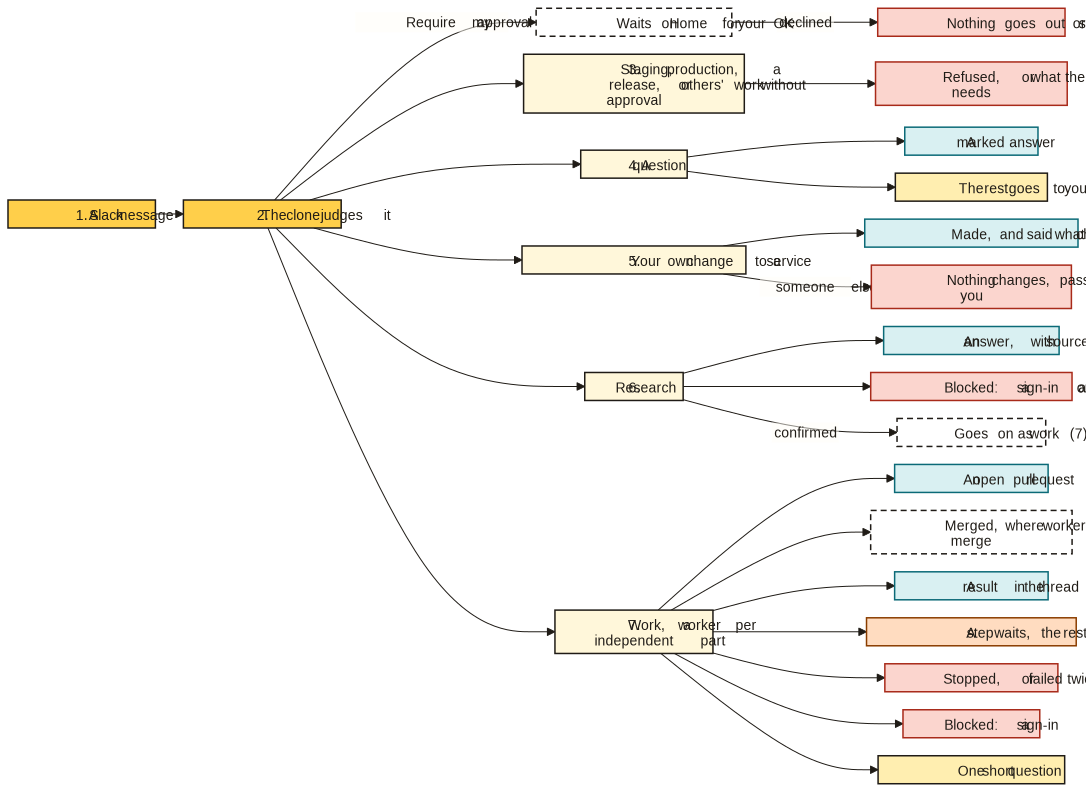
Select the diagram to open it full size. Teal ends with a result, orange waits, red stops or refuses, yellow is your decision, and a dashed outline applies only when its condition holds.
- A Slack message reaches your clone.
- The clone reads the thread and judges the request. While Require my approval is on, its reply, and any work it would start, waits on Home for your OK; declined, nothing goes out or starts.
- Staging, production and a release are refused. A change to someone else's code or document needs their approval first.
- A question one read settles gets a marked answer naming its source. If it needs more and the asker may not ask for work, the rest goes to you.
- Your own change to a Doc, Sheet, ticket or page is made by the clone, which says what changed. If anyone else asks, nothing changes and it goes to you.
- Research goes to a worker, which reports with sources and doubts. A confirmed problem goes on as work.
- Work goes to workers, one per independent part. It ends with an open pull request, a merge where workers may merge, or a result in the thread. It can also wait on something missing, stop (you paused, or it failed twice), be blocked by a missing sign-in, or ask you one short question.
Follow the work and take it over
The requester hears in the thread when the clone takes the work, needs an answer, and finishes or stops; when it is someone else, you also get a brief in your self-DM. A made-up exchange in #shop-backend, where :misha: is Leo's emoji:
Emma Lee: @Leo Novak the checkout total drops discount codes again, can you take a look?
Leo Novak: :misha: On it, SHOP-142. I'll post here when the fix is ready for review.
With approvals on, that reply and the work behind it first wait on Home under Waiting for your OK. Once they run, Home lists the workers under Working on now. To carry on yourself, open the branch and pull request the work made, or its worktree in ~/.misha/workers/worktrees; work with no repository runs in ~/.misha/workers/scratch.
To stop work, ask the clone in your self-DM to stop a worker, or pause Misha. Workers you start from your own Claude Code or OpenCode sessions keep running. Nothing undoes a post, a merge or a deploy that already happened.
What stays yours
- Staging, production and releases. The clone refuses them whoever asks. That is an instruction to the clone and its workers, so what your GitHub and AWS accounts permit is the hard limit.
- The limits. Who may ask for work, where workers may merge, what's added on Extensions and your Routines change only by you.
- Your decisions. A decision that is yours comes as one short question, and only the step that depends on it waits.
- Someone else's work. It needs their own approval in their own message.
Send colleagues Talking with a clone so they know what they're talking to. How Misha works explains what runs on your Mac and what reaches Slack and your model provider, and Control and maintain Misha covers pausing, Home and removing Misha.