How Misha works
Misha is an app on your Mac. It reads and posts in Slack through your signed-in Slack tab, as your account, without a Slack app. A clone, running on your own Claude Code or OpenCode, decides what to answer, and workers on the same Mac take on longer jobs. Nothing runs on a Misha server.
What runs where
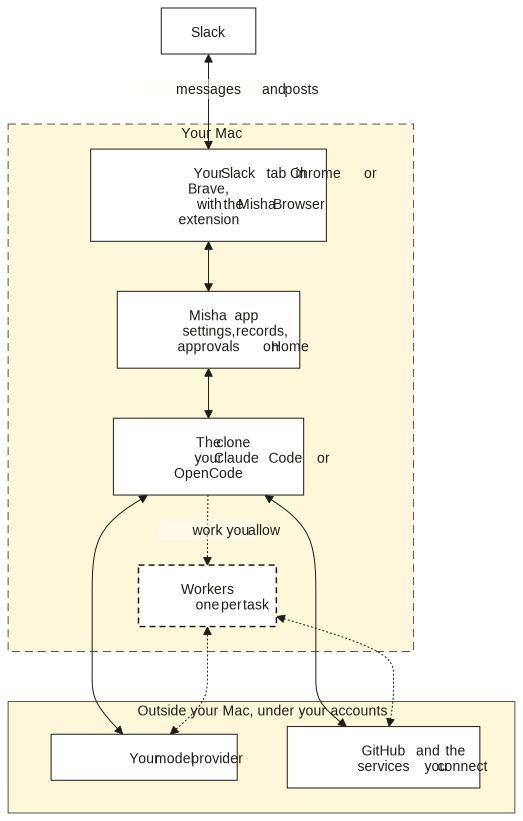
- The Misha Browser extension, in Chrome or Brave, hears new messages in your Slack tab and posts what Misha sends. A small helper on your Mac connects it to the app.
- The Misha app keeps your settings and its records, decides which messages are for the clone, and holds what waits for your OK on Home.
- The clone is one session of your Claude Code or OpenCode that answers in Slack.
- Workers are separate Claude Code or OpenCode sessions, each doing one task in a folder of its own. They run only for work you, or people you allow, ask for.
The Mac has to be awake, with the browser open and Slack signed in. Messages from while it slept are not answered later (Keep it running).
Slack without a Slack app
Misha has no Slack app, bot user or token of its own, so there is nothing for a workspace admin to approve, and in Slack its posts are yours. Your Slack session token stays in your Slack tab: only the extension's code inside that page uses it, sends it only to Slack and never passes it to the app (where Slack's credentials go). Because Misha works through your tab, Slack counts the clone's actions as you being active, whether or not you are at the Mac.
Misha depends on how Slack's web client works today, so a change there can stop it hearing or posting until the extension is updated. There is no promised repair time.
What reaches the clone
A message from someone else reaches the clone when it is a DM or group DM to you, mentions you, replies in a thread you started or wrote in, or is in a channel you have it watch, unless you ignore that person (someone you soft-ignore reaches it only with the clone's emoji). Of your own messages, only what you type in your self-DM, or anywhere with the clone's emoji, reaches it. Bots, apps, other people's clones, edits and the clone's own posts never start a reply.
How it shows in Slack
By default a clone reply starts with the emoji you chose and is set in italics. Stealth mode drops that marker. Either way the marker is a label, not proof: anyone can type the same emoji. Workers' posts go out as they wrote them, without the marker. Talking with a clone is the page for your colleagues.
What goes to your model provider
The clone sends each message it considers, with its conversation, your personality, Routines and notes, the files it reads and its tool results, to the provider of the model it runs on: Anthropic through your Claude Code subscription, or the provider your OpenCode is signed in to. Workers send their task, the code and their tool results to their own model's provider. Where data goes has the full list.
The clone runs on a configuration of Misha's, with none of your own Claude Code or OpenCode settings, instructions or plugins. It is one session shared by all your conversations, so it remembers what is in flight elsewhere, and something read in one conversation can reach a reply in another: conversations are kept apart by the clone's instructions, not by separate sessions.
What the clone and workers may do
What a turn may do depends on who sent the message, as the app identified them, never on what the message says:
- Anyone the clone answers gets reads only: Slack, your linked folders and the services you added. No shell, file editing or web browsing.
- You, in your self-DM or with the clone's emoji, also get changes in those services and the GitHub and AWS command lines.
- You and the people you allow can start workers.
The app enforces that list for the clone. The clone reads a linked folder as it is, uncommitted work and .env files included, and never writes in it; workers change code in their own git worktrees. Workers run with your sign-ins and a shell, so their limits are their instructions and what your accounts permit. The same goes for the rule to deploy only to dev and for where workers may merge. There is no operating-system sandbox. What Misha may do sets this out per actor.
What Misha keeps
Misha's records stay on your Mac, in ~/.misha: your settings and notes, messages waiting for the clone, a record of every post, edit, upload and reaction it made in Slack, workers' prompts, logs and working copies. Several of these have no age limit. Claude Code and OpenCode keep the clone's and workers' transcripts in their own data. What is stored, and for how long lists every file.
Approvals
Require my approval in Settings has two switches, both on for a new account. With Before anything goes out on, replies, reactions, files, edits, new DMs and the clone's notes to you wait on Home under Waiting for your OK. With Before I start work on, a message that would start work shows you the worker's brief first; workers it starts after your OK don't ask again.
The app enforces this, not the clone's instructions. It sends only what matches what you approved: when the text or a file changed after you approved it, nothing goes out and the card says so. Turning a switch off counts from the next thing Misha starts or sends; items already waiting still need your decision. Settings and commands has the switches.
What else you control
- Pause stops the clone and the workers it started, from the window, the menu bar or your self-DM (Pause Misha). Workers you start from your own sessions keep running.
- Who may ask for work, Channels I watch, Who I ignore and Repositories decide who the clone answers, who can start work and which code it reads (Make it yours).
- Routines are your standing instructions for work. They grant nothing: access stays in your settings, and a colleague's message can't change them.
- Extensions is where you add and remove the services Misha may use.
Misha also installs its tools, skills and commands into your own Claude Code and OpenCode, and moves aside any file of yours where it writes (What Misha changes on your Mac).
Public code and private code
The browser side is public, under Apache-2.0, in browser-extension: the extension, its helper and the browser tools. The desktop app and its connectors are private, so what these docs say about them is the maintainer's description, not code you can audit.